
Advertising where people actually look
regiowerber shows your campaign on public advertising screens and on screens at selected locations in Switzerland. You pick the screens one by one, billing uses their day price per asset and day, and reach and interaction stand alongside as proof.
Every screen has its own day price. The range of day prices is on the pricing page.
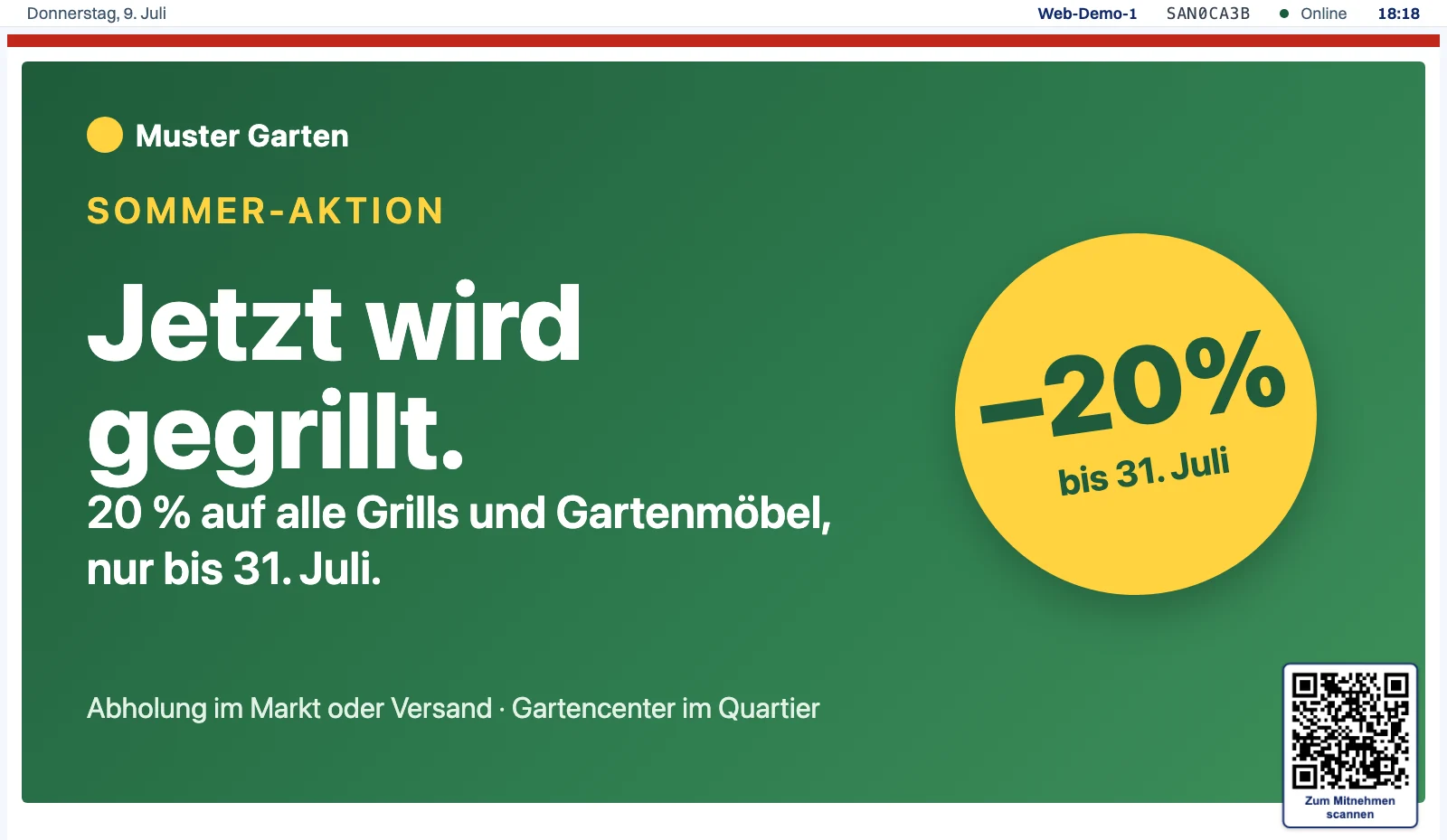
This is how your advertising looks on the screen
On a public advertising screen your advertising fills the whole surface. At other locations the advertising gets the whole surface or part of it, depending on the location. In this ad zone the campaigns run in rotation.
Ad zone
Your campaign runs in rotation with others, clearly visible on the screen.
QR take-away
Anyone interested takes your offer straight to their phone via the QR code. On public advertising screens that is the interaction that gets counted.
Touch tab
On screens with touch, a tap on the ad opens more, and every touch counts as interaction.
On the screen in three steps
The path from booking to a running campaign stays short.
Create the campaign
In the ad portal you upload your asset and choose the screens it should run on. For each one you see the address, the surroundings and the day price.
Approval by the screen operator
The operator of the booked screens reviews each asset on its own and promptly, so the screens stay clean and the locations accept the advertising.
Playout and reporting
Your ad runs in the chosen time window, and you see anonymous figures for reach and interaction per day and asset.
No asset yet? Quartiero GmbH designs it on request. Have your ad designed
What does a campaign cost?
Every screen has a day price, and billing runs per asset and day. The range of day prices and a worked example are on the pricing page.
Why regiowerber for local advertising
Exactly the screens that fit
You search the ad inventory by place, address or location type and take each screen one by one. A local business therefore pays for the spots it actually wants to reach.
Provable impact
A presence sensor measures how often your ad was shown to someone actually standing in front of the screen. When someone scans the QR code and takes your offer to their phone, it counts as a take-away, the strongest signal of real intent; on public advertising screens it is the interaction that gets counted. On screens with touch every touch is added. You see your campaign's performance as numbers rather than an estimate.
You pay for the screens you choose
Billing uses the day price of the screens you select yourself, per asset and day. Reach and interaction then prove the effect and do not enter the price.
A checked environment
The operator of the booked screens reviews every asset before it runs. Your advertising appears in a well-kept setting that the people in front of it take seriously.
Formats and structure
Your content can be text in Markdown or HTML, with headings, text and embedded images, or a single medium on its own: an image, a multi-page PDF where the pages flip, or a short video that autoplays muted. To a text piece you can also add attachments, such as a PDF or an image, shown below as a tap-to-open link. In the campaign you set a time window per entry, from when to when it is visible. That way a promotion fits precisely into its running period. File types, resolution and maximum duration are listed together in the frequently asked questions below.
Measurement without personal data
The counting is fully anonymous and complies with the revised Swiss data protection act. The sensor registers movement only. Also counted is whether a screen with touch was touched and whether the QR code was opened, with no camera, no facial recognition and no login of the people in front of the screen. You receive purely anonymous, aggregated figures per campaign.
Frequently asked questions
What does a campaign cost?
Every screen has a day price. Billing runs per asset and day, with a surcharge for a video asset. The range of day prices and a worked example are on the pricing page. The network is still growing, and which screens are bookable shows when you create the campaign in the ad portal.
Is there a minimum term?
No. You can pause a campaign in the ad portal at any time or switch off individual assets. Only the days on which your assets ran up to then are billed.
How quickly does my ad go live?
After you submit, the operator of the booked screens reviews each asset promptly. It then runs in the time window you chose. If you book screens of several operators, it runs on the screens of each operator as soon as that operator has approved it.
Is every asset reviewed, and what does that cost?
Yes. The operator of the booked screens reviews every asset before it runs for the first time. The review is mandatory, self-service included, and it is free of charge. Rejected on content grounds are unlawful or misleading advertising, political and religious advertising, pornography, content that glorifies violence, discriminates or endangers minors, advertising for tobacco, addictive substances and gambling, and inadmissible health claims; for alcohol and medicines the statutory rules apply. Rejected on technical grounds is an asset whose file does not play, that runs longer than the maximum duration, that loads files or addresses from outside your media library, whose text is not legible, whose QR code leads nowhere or somewhere other than announced, or that imitates controls. You remain responsible for the content, also after approval. The exact wording on inadmissible content is in the terms and conditions.
What technical requirements apply to an asset?
An asset can be an image (JPG, PNG, GIF, WebP or AVIF), a video (MP4, WebM or MOV, played without sound), a multi-page PDF or a document you write in Markdown or HTML. The screens typically show Full HD, that is 1920 × 1080 pixels in landscape or 1080 × 1920 pixels in portrait; the advertising portal shows the resolution and format of each screen when you pick your screens. An asset runs for 30 seconds at most. A location can have a shorter display time, in which case the asset is cut off there after that time, and some locations show no video. You see both when choosing the screens. How to build a document in Markdown or HTML is shown in the guide in the help center.
Can I have my asset designed?
Yes. Quartiero GmbH designs your asset on request, as an image, as an animated HTML asset or as a short video, fitted to the screens you choose. The price depends on the effort, and you receive a quote without obligation beforehand. More on the page Have your ad designed.
How long is my asset shown at a time?
The ads run one after another, each for 30 seconds at most, in rotation.
Can I swap an asset while the campaign runs?
Yes, at any time. You can change an asset or replace it with a new one. A changed or new asset goes back into review and only runs once approved. While a switched-on asset waits for its review, the campaign pauses on the screens of the operator still reviewing it.
Where exactly does my ad appear?
In the ad zone of the screen. On a public advertising screen that is the whole surface, at other locations the whole surface or part of it, depending on the location. Which screens those are is your own choice in the selection.
What proof do I get?
The proof is created automatically, per day and asset. It shows the reach counted by an anonymous presence sensor, and the interaction. On public advertising screens the interaction counted is the scan of the QR code; touches are added only on screens with touch. These figures do not enter the price.
Do the screens record personal data?
No. There is no camera and no facial recognition on the screens. They only count anonymously whether someone moved in front of them and whether the screen was touched or the QR code was opened, each as a plain count with no reference to a person.
Do I have to set up the campaign myself?
No. If you would rather not set up your campaign in the ad portal yourself, request it through the contact form and choose “Book a campaign” there. regiowerber will get back to you. Every asset is reviewed on this path too.
Ready for your first campaign?
Create your campaign directly in the ad portal, or ask your questions about the screens first. regiowerber will answer you.
A message costs nothing and commits you to nothing.